Navigate the argument
The window has five areas. They are named for what they are responsible for, not where they sit, because the layout is expected to change: App shell and UI areas.
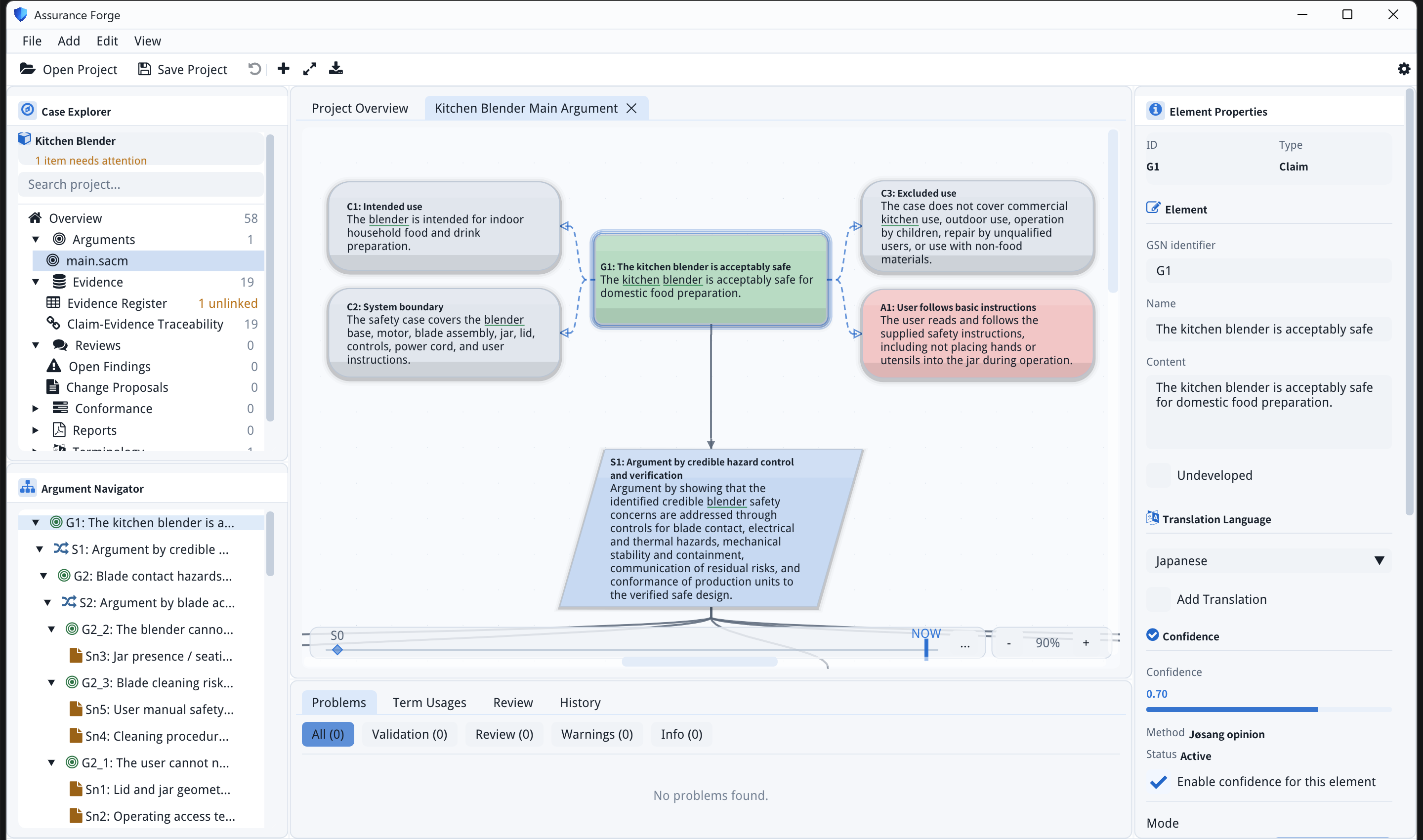
Case Explorer (left, top)
A projection over the project that follows assurance work rather than the directory layout. Under the project name is a count of items needing attention, a search box, and the sections:
| Section | Holds |
|---|---|
| Overview | The project overview tab: counts across arguments, evidence, reviews, proposals, problems, conformance and reports |
| Arguments | One entry per SACM argument file; opens as a canvas tab |
| Evidence | The evidence register and claim-evidence traceability, with an unlinked count when evidence supports nothing |
| Reviews | Open findings and change proposals |
| Conformance, Reports | Conformance tracking and report placeholders |
| Terminology | Terminology packages — the glossary |
| Advanced | The raw SACM package tree and the project's files |
Argument Navigator (left, bottom)
The argument as a tree — [Claim], [Strategy], [Solution], [Context] — in
support order. Clicking a row selects the element and centres the canvas on
it, which is the quickest way to travel a large argument.
GSN canvas (centre)
One tab per open argument package, titled after the package. Nodes are laid out automatically; there is no manual positioning, so the layout is a function of the argument and nothing else.
| To | Do |
|---|---|
| Pan | Mouse wheel (vertical), Shift+wheel or a touchpad's horizontal gesture |
| Zoom | Ctrl+wheel (zooms at the pointer), the − / + buttons by the zoom percentage, or the + / − keys |
| Reset zoom | 0 |
| Fit the whole argument | The fit button in the toolbar — useful for orientation, but a large case fits at a percentage too small to read |
| Select | Click a node or an edge |
| Act on a selection | Right-click for the element context menu — see Edit the argument |
Below the canvas is the history timeline (S0 … NOW), which pins the
canvas to an earlier point in the audit history; see
Review an element.
Inspector (right)
The selected element's ID and type, its GSN identifier, name and content, its undeveloped flag, the secondary-language fields, and its confidence assessment when one exists. Edits here go through the same audited commands as everything else.
Feedback dock (bottom)
Tabs: Problems, Term Usages, Review, History, plus Draft Changes while a working draft exists, and AI Debug when developer tools are switched on in View → Developer.
Appearance
View → Appearance switches theme (Dark, Light) and language (English, 日本語). The interface language is separate from the languages the argument is written in — see two languages.